
madVR Envy Video Processors
madVR has redefined what's possible in home theater video processing. Their Envy line of processors sits between your source devices and your projector or display, applying real-time tone mapping, upscaling, and dynamic HDR processing that transforms the image quality of everything you watch. For home theater enthusiasts who demand the absolute best picture quality, madVR is the gold standard.
Products
Every Envy model shares the same award-winning HDR feature set, including frame-by-frame dynamic tone mapping, instant aspect ratio management, non-linear stretch, and 1D/3D LUT calibration support. The Premium Pack add-on for Core models unlocks additional features and doubles the warranty.
Envy Core MK1
The entry point to madVR’s Envy lineup. Patent-pending DTM 2.0 analyzes every frame in real time, with 4K upscaling, instant aspect ratio handling, Dynamic Subtitle Overlay, and IP-based control. 2-year warranty.
Envy Core MK1 w/ Premium Pack
All the Core MK1 capabilities with the aftermarket Premium Pack add-on, unlocking additional processing features and doubling the warranty to 4 years. The best value in the Envy lineup for dedicated theater rooms.
Envy Core MK2
Next-generation Core with an NVIDIA 5060 GPU, doubled RAM, and full 48 Gbps HDMI 2.1 I/O. Supports 4K/120p 12-bit, VRR up to 360Hz, DeinterlaceAI™, and AI upscaling. 8K-ready with Premium Pack.
Envy Core MK2 w/ Premium Pack
The Core MK2 with its Premium Pack unlocked — adding ultra-low-latency gaming, full 8K I/O, Dynamic Subtitle Overlay™, and a doubled 4-year warranty. The sweet spot for enthusiasts who want MK2 hardware with maximum capability.
Envy Pro MK3
NVIDIA 5060 GPU in a premium all-aluminum chassis with triple-fan cooling and ECC dual-channel RAM. 5K and 8K upscaling, full HDMI 2.1, direct AV gear integration for masking systems, and a 5-year warranty.
Envy Extreme MK3
The flagship. NVIDIA 5080 GPU with Glacier X2 cooling, 8K60 and 4K120 output, MotionAI™ for artifact-free motion interpolation, geometry correction for off-axis and anamorphic setups, and a 5-year warranty with paid hardware upgrade eligibility.
About
What makes madVR special is the depth of customization and the quality of their processing algorithms. Dynamic tone mapping adapts frame by frame — not scene by scene — preserving highlight detail and shadow depth that other processors miss. Combined with proprietary upscaling that rivals native resolution, a madVR Envy processor makes even older 1080p content look stunning on a 4K display.
TekScene is Columbia, SC's local source for madVR Envy. We don't just sell the hardware — we configure it. Every madVR Envy processor we install is configured and tuned to your specific projector, screen material, and room environment. The difference between a default madVR setup and a properly configured one is the difference between impressive and jaw-dropping. As South Carolina's premier madVR dealer, TekScene serves Columbia, SC and the surrounding metro — Chapin, Lexington, Irmo, West Columbia, and Lake Murray.
What an Envy Actually Does
A video processor sits between your sources and your projector and rebuilds the image before it ever reaches the lens. These are the jobs it takes on.
Dynamic tone mapping
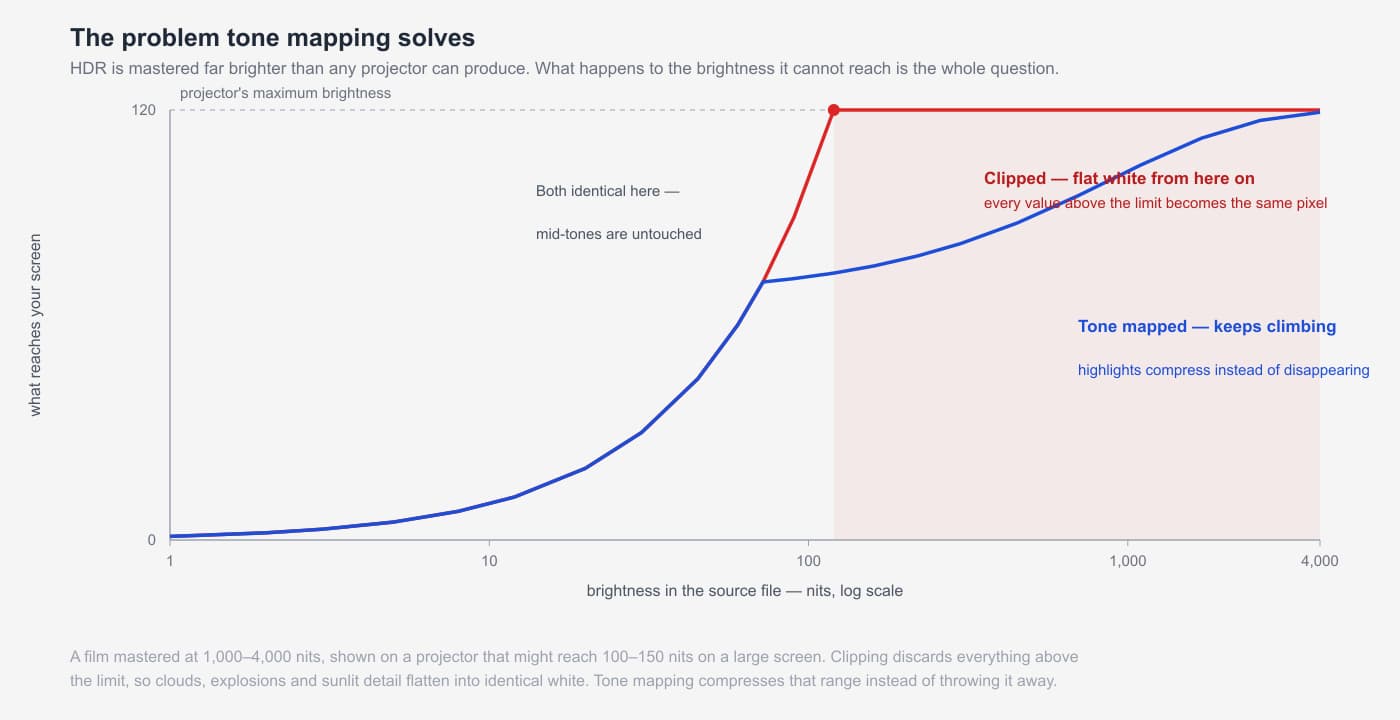
HDR content is mastered far brighter than most displays can reproduce, and projectors have the hardest time of it. A film graded at 1,000 to 4,000 nits shown on a projector that might manage 100 to 150 nits on a large screen leaves an enormous gap, and something has to give.
The crude answer is to clip: show everything up to the projector's limit accurately and let everything above it become the same flat white. Clouds lose their shape, explosions become a white blob, and sunlit detail disappears. The Envy instead compresses that range, so highlights keep climbing and keep their detail.
What makes madVR's approach different is that it analyzes every frame in real time rather than relying on metadata the studio embedded once for the whole film — and DTM 2.0 lets you choose the look, from very natural and detailed through to more contrast and punch.
Aspect ratio management
This is the feature people underestimate before they own one, and rely on daily afterwards. A scope screen is 2.35 or 2.40:1, but content arrives in at least a dozen different shapes, and matching them by hand every time is exactly the kind of friction that stops a theater getting used.
The Envy detects the aspect ratio instantly from the image itself rather than from metadata, then applies the right zoom, and it can drive motorized masking systems directly so the screen borders move to match. Change discs, change ratio, and the room simply adjusts.
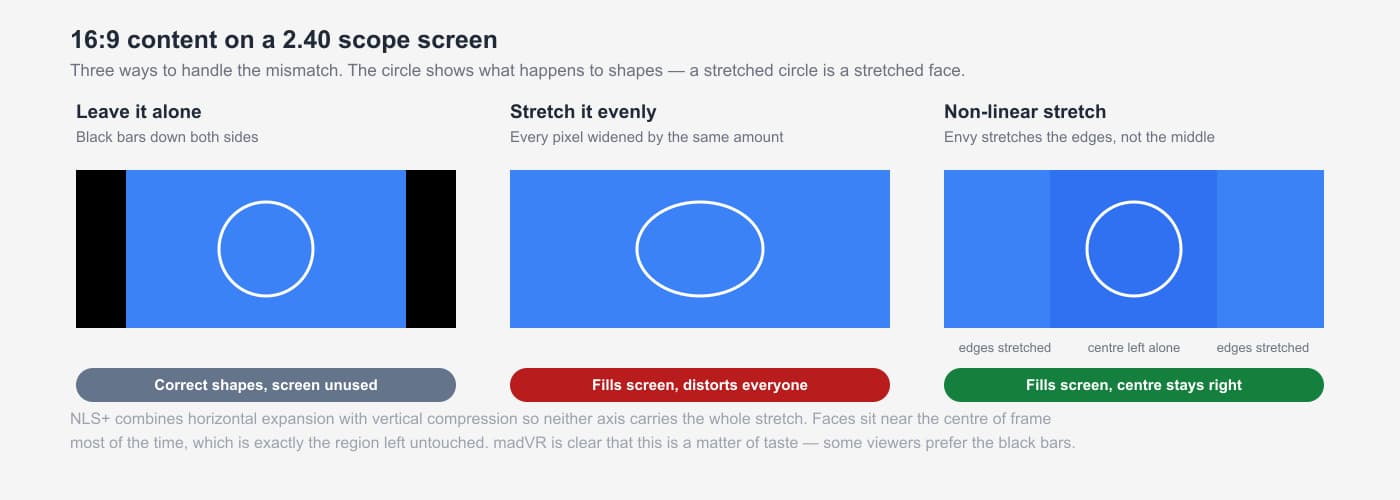
It also offers non-linear stretch. Filling a scope screen with 16:9 content normally means either black bars down the sides or stretching everyone in the frame wider. NLS+ stretches the edges while leaving the center close to correct, and combines horizontal expansion with vertical compression so neither axis carries the whole distortion. madVR are refreshingly direct that this is a matter of taste — plenty of people prefer the bars, and the Envy is happy either way.
Upscaling and motion
Most of what you watch is not 4K. The Envy upscales HD and SD sources with algorithms considerably more sophisticated than those inside a projector, TV or receiver, which is where a large screen is least forgiving — the bigger the image, the more obvious the difference between good and adequate scaling.
On the higher models, MotionAI addresses a different problem: the sample-and-hold behavior of modern projectors and flat panels, which produces motion blur and judder that has nothing to do with the source. It interpolates at the per-pixel level using machine learning rather than the block-level approach used in most displays' smoothing modes, which is why it avoids the halos and tearing those are known for.
Worth being straight about this one: madVR describe MotionAI as an emerging technology whose setup 'may require a level of technical acumen', and motion interpolation is divisive on principle. Some viewers want judder gone, others consider it part of how film looks. It is adjustable across a wide range, including off.
Subtitles on a scope screen
A small feature that solves a genuinely irritating problem. On a 2.40 screen showing scope content, subtitles are often authored to sit in the letterbox area — which on your screen is not screen at all. They land on the wall below the image, or get cropped away entirely.
Dynamic Subtitle Overlay detects the subtitles and repositions them into the picture, and can adjust their brightness so they are readable without being a glowing distraction in a dark scene.
This matters more than it used to. Survey work madVR cite puts subtitle use at around half of US viewers most of the time, rising to roughly 70% among 18-to-24s — driven less by hearing difficulty than by dialogue that is simply hard to follow in modern mixes.
Why Buy madVR Through TekScene
- Expert configuration, not just installation — A madVR processor is only as good as its configuration. We set up every unit to your specific display, screen material, viewing distance, and content preferences — unlocking performance that out-of-the-box settings can’t touch.
- Direct support channels and warranty coverage — As a madVR dealer with direct access to technical support and firmware updates, you get proper warranty coverage and a knowledgeable local contact for any questions down the road.
- Full system integration — We ensure your madVR processor works seamlessly with your projector, AV receiver, streaming devices, and disc players. HDMI handshake issues, EDID management, and signal chain optimization are all handled before we leave.
- Local, ongoing support in Columbia, SC — We’re local to the Columbia, SC metro (based in Chapin) — not a faceless online retailer. Firmware updates, reconfiguration after a projector upgrade, or troubleshooting an issue are all a phone call away.
Frequently Asked Questions
My projector already does tone mapping. Why add an Envy?
Most projectors and better TVs do, and some do it well — JVC's Frame Adapt is genuinely good. (Every HDR projector tone maps, because none can reach the light levels HDR is graded for — see why HDR looks different on a projector.) Where an Envy pulls ahead on tone mapping specifically is headroom: it is a dedicated machine with a desktop-class GPU doing one job, analyzing every frame in real time rather than working from metadata the studio embedded once, with several selectable HDR looks and processing matched to your specific display and screen.
But tone mapping is only part of what the box is for, and plenty of owners end up valuing the rest more. Nothing inside your projector detects aspect ratio instantly from the image and drives motorized masking to match. Nothing inside it offers non-linear stretch to fill a scope screen, or repositions subtitles that would otherwise land on the wall below the picture. Its upscaling of the HD and SD content that makes up most of what you watch is not in the same class, and on the higher Envy models neither is the motion processing.
So the honest framing is not tone mapping versus tone mapping. If your projector's HDR already satisfies you, an Envy can still be worth it for aspect ratio automation alone — that is the feature owners tend to use every single day. Tell us what you have and what actually bothers you about the picture or the workflow, and we will tell you whether the answer is a processor or something else.
There is a detailed treatment of what an Envy actually does — tone mapping, aspect ratio management, upscaling and subtitle handling further up this page.
Which model should I get — Core, Pro or Extreme?
The models differ in GPU power, I/O and which advanced features are unlocked, and the honest guide is what you are driving and how far you want to go.
Core MK1 and MK2 cover the core capability — tone mapping, upscaling, aspect ratio handling — with MK2 adding an NVIDIA 5060, full 48 Gbps HDMI 2.1, 4K/120p and AI upscaling. The Premium Pack on either doubles the warranty and unlocks further processing. Pro MK3 adds a premium chassis with ECC memory, 5K and 8K upscaling, and direct control of masking systems. Extreme MK3 is the flagship — a 5080 GPU, MotionAI, geometry correction for off-axis and anamorphic setups.
The practical questions are your screen shape, whether you need masking control, whether motion handling matters to you, and what resolution your display accepts. Tell us the room and we will narrow it quickly.
madVR or Lumagen — which should I get?
They are two tools solving the same set of problems, and both solve them well. Tone mapping HDR down to what your display can actually produce, upscaling the HD and SD content that makes up most of what you watch, handling aspect ratios and masking so a scope screen behaves itself. Either one, properly configured, transforms a system. Neither is a mistake.
Where they differ is emphasis. madVR is built around a desktop-class GPU, and that horsepower buys features Lumagen does not offer — MotionAI interpolation, AI upscaling, dynamic subtitle repositioning — along with a much larger 3D LUT, 256³ against Lumagen's 17³ or 21³. Lumagen is built around precision and integration: true genlock so no frame is ever repeated or dropped, up to ten inputs with real switching, an audio-only output option, direct screen masking control, rack mounting, and a long habit of supporting hardware years after purchase.
So it comes down to which of those features you actually want, and what you want to spend — the two lines do not sit at the same price points, and both have entry models that make more sense for some rooms than the flagships do. Tell us the rest of the system, which of those capabilities matter to you, and roughly where you want to land on budget, and we will lay out what each would give you. We sell Lumagen as well, so we have no reason to steer you.
Will it work with my display?
Almost certainly — and it is not a projector-only product, which is a common assumption. An Envy improves any display fed by HDMI: projectors, OLED and QD-OLED televisions, LED walls and 21:9 panels. The brighter the display, the less dramatic the tone mapping rescue, but upscaling, aspect ratio handling and motion processing apply just the same.
madVR support displays specifically rather than generically, publishing model-specific setup guides for JVC, Epson, Sony, Barco and Christie projectors as well as LG OLED and Samsung QD-OLED panels, covering which settings to use so the display and the Envy are not doing the same work twice.
That last point matters more than it sounds. The commonest way to end up disappointed is leaving the display's own tone mapping and dynamic contrast running while the Envy does the same job upstream. Setting the display up correctly for a processor is a real part of the work, and it is model-specific.
Can I buy an Envy and set it up myself?
No — an Envy is sold installed, not boxed and carried out, and we would not sell one any other way.
The reason is that an unconfigured Envy is not worth what you paid for it. It has to be matched to your specific display, screen and room: the display's own processing turned off or set correctly, HDMI signal chain and cabling verified at full bandwidth, aspect ratios and any masking system set up, profiles built for the sources and content you actually watch. A default configuration on the wrong display can look worse than no processor at all.
Proper configuration is included in the sale rather than quoted as an extra. Full instrumented calibration, including 3D LUT work, remains a separate service — but you will never receive an Envy from us that has not been set up properly for your room.
Does an Envy replace calibration?
No — it makes calibration more valuable, and the two do different things. The Envy processes the image; calibration measures how your particular display and screen actually reproduce it and corrects the difference. It supports 3D LUT calibration workflows through CalMAN and ColorSpace, a more precise form of correction than most displays' internal controls allow.
Configuration and optimization for your display, screen and room are included in the sale of every Envy we supply. Full instrumented calibration, including 3D LUT work, is a separate service priced by scope. An Envy calibrated to the display it is feeding is where this hardware genuinely earns its keep.
Do I need special HDMI cables?
Very possibly, and this is the single most common source of trouble. An Envy sits in the middle of the chain, so there are now two HDMI runs instead of one, and the output run is carrying whatever the Envy is producing — up to 4K/120p or 8K on the newer models, at full bandwidth.
Marginal cables that happened to work before will not necessarily work now, and the failure is rarely obvious: instead of no picture you get intermittent dropouts, handshake failures or sync that takes an age. madVR publish specific cabling requirements, and for longer runs this usually means certified fiber optic HDMI. It is worth settling before installation rather than diagnosing afterwards.
Can it drive my masking system and my control system?
Yes, and this is one of the reasons an Envy ends up feeling less like a component and more like the brain of the room. Aspect ratio is detected instantly from the image, and the Envy can drive motorized screen masking directly so the borders track the content.
It integrates with Control4, Crestron, Savant and RTI, with published drivers and guides for each, and offers IP control. In a well-integrated room this means one button gets you from lights up to the right ratio, correct masking and the right picture profile.
What is the Profile system for?
It is what stops a processor this configurable from becoming a chore. Profiles let different settings apply automatically depending on what is playing and where it came from — a different look for HDR film than for a bright sports broadcast, different handling per source device, per aspect ratio, per resolution.
That matters because the ideal settings for a dark scope film and for daytime sport are genuinely different, and nobody wants to be in a settings menu before every viewing. Configured properly, the box makes those decisions on its own.
Is this worth it if my projector isn't top of the range?
Often yes, and sometimes more so. Tone mapping matters most when the display has less brightness to work with, which is why projectors benefit most of all — because the gap between what the film was mastered at and what your projector can show is wider — that is precisely where a crude clip does the most visible damage.
That said, we would not recommend one as your first upgrade. Screen choice, light control, mounting and setup all come earlier, and the Envy is the step you take once those are right. If you tell us what you have and what is bothering you about the picture, we will tell you honestly whether a processor is the fix or whether something cheaper is.
Interested in madVR? Let’s Talk About Your Project.
Whether you’re building a new theater or upgrading an existing one, we’ll help you choose the right madVR processor and configure it for the best possible picture.
More from TekScene
Related Brands